Subscriptions work best when revenue is clear and customers can easily make simple changes.
This month’s updates focus on two areas that matter most when you’re growing subscriptions:
- Clear, stable visibility into subscription and one-time revenue
- Easier ways for subscribers and support teams to handle common changes
We shipped improvements that make revenue performance easier to understand, promotions easier to run, and subscription changes easier to manage, without pushing customers toward cancellation.
Here’s what’s new, along with a look at what’s coming next.
This Month’s Highlights At a Glance
- NEW: Reporting & Analytics (Subscription + One-Time Revenue): See subscription and one-time revenue together in one stable analytics view. Pick specific date ranges and compare revenue performance, AOV changes, and understand how retention efforts actually affect one-time and recurring subscription revenue.
- NEW: Shopify Coupon Matching for Autoship: QPilot offers many features for automating and managing Coupons for recurring subscription orders like LTV conditions and number of renewals, or setting up ladder discounts that reward loyal subscribers automatically. Now, coupon codes added to Shopify Checkouts that match with coupon codes in QPilot will automatically be validated and applied to ongoing subscriptions, so that promotions flow cleanly from subscription checkout into future Scheduled Orders. No extra setup required.
- NEW: Quick Action Links: Send subscribers one-click links to skip, pause, or update their Scheduled Orders directly from email or SMS. Fewer tickets, faster resolutions, and more subscribers staying active.
- NEW: Merchant Portal Improvements: Manage subscribers and Scheduled Orders easily from your phone. Search customers, view orders, and make quick changes without always needing your computer.
- COMING SOON: Snooze Instead of Pause: Give subscribers a pause that automatically resumes. More flexibility for customers, fewer lost subscriptions for merchants.
Subscription Revenue Reporting: Subscription and One-Time Revenue Side by Side
New for Shopify and WooCommerce
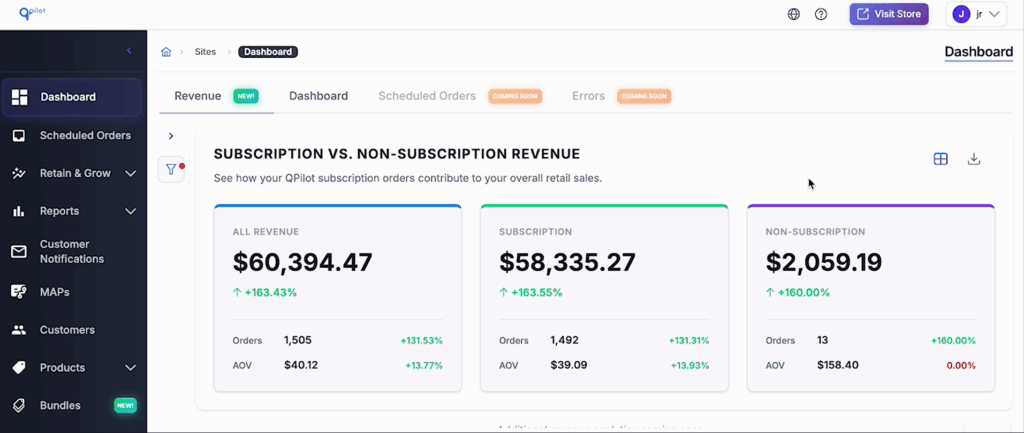
Merchants and ecommerce marketers need a clear way to understand how subscriptions are performing compared to one-time orders.
Many reporting tools make this harder than it should be. Data shifts over time. Reports don’t line up. You end up exporting numbers from multiple places just to answer basic questions, which makes it difficult to trust what you’re seeing, let alone make confident decisions.
If you can’t clearly compare subscription revenue to one-time revenue, it’s hard to know where to invest or what to improve next.
That’s why we built Subscription Revenue Reporting with one goal: give merchants stable, trustworthy revenue data in one place.
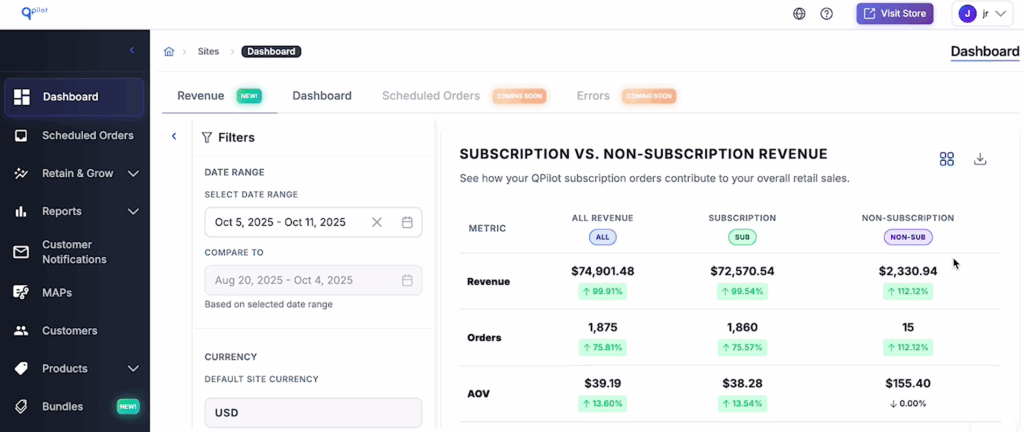
With Autoship’s Subscription Revenue Analytics, you can now:
- See subscription and one-time revenue side by side
- View clear, stable revenue numbers, not more charts
- Compare any date range or performance period
- Track changes in AOV and subscriber acquisition over time
- See how dunning, incentives, and retention workflows affect recurring revenue
- Export clean, consistent data for forecasting, AI analysis, or internal reporting
Once revenue is recorded, it doesn’t change. Refunds and adjustments are tracked separately, so past reports stay accurate and comparisons remain reliable.
This gives you a clear, dependable view of how subscriptions are performing today — and it’s just the beginning. Multi-currency reporting and revenue forecasting are already on the way.
Shopify Coupon Matching: Extend Promotions Beyond Checkout
New for Shopify
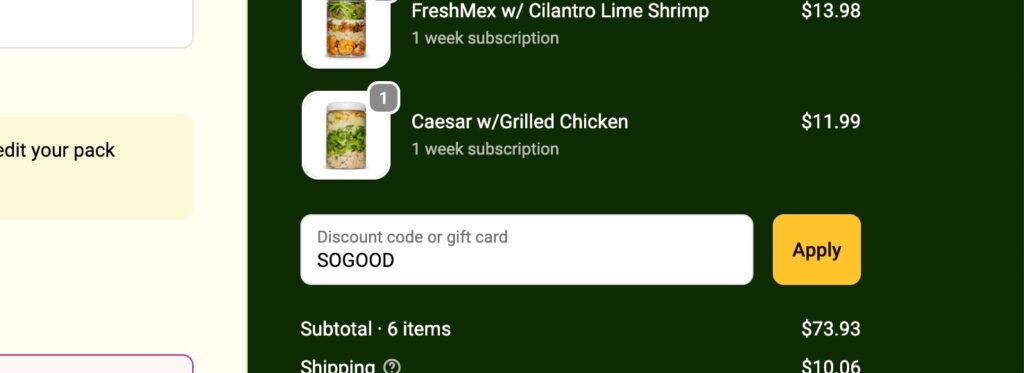
Coupon-driven acquisition and retention strategies work best when a single offer can carry through the entire subscriber lifecycle.
With Shopify Coupon Matching, the coupon codes you use at checkout can now be used seamlessly with Autoship’s more robust coupon logic so that subscriber promotions don’t need to stop at the first order.

This means Shopify merchants can now:
- Offer a single coupon code at checkout that can also apply automatically to future Scheduled Orders
- Apply Autoship coupon rules like usage limits, multi-cycle discounts, and lifecycle conditions
- Run more advanced acquisition, retention, and win-back campaigns
- Use a single coupon code across Shopify and Autoship without extra setup
By connecting Shopify checkout offers with Autoship’s richer coupon capabilities, merchants gain more control over how discounts apply over time.
One checkout. One coupon code. Simple and effective marketing.
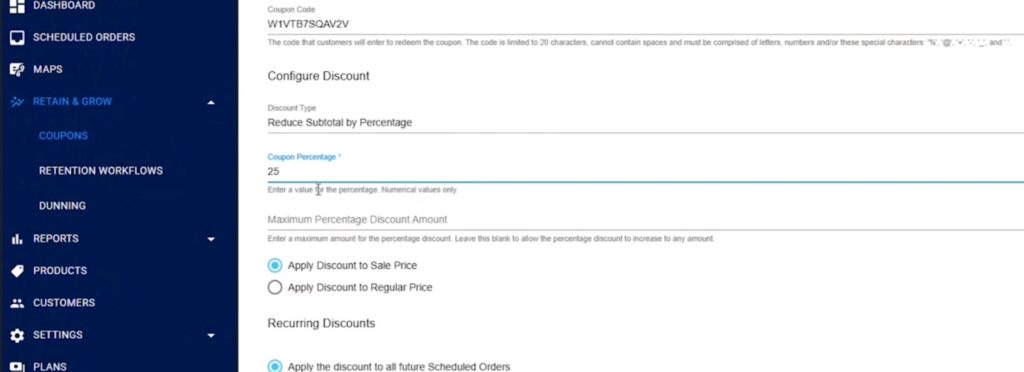
Quick Action Links: Turn Messages into Actions
New for Shopify and WooCommerce
Making simple subscription changes shouldn’t require sending customers into a full portal experience, especially because such moments can lead to cancellations.
Quick Action Links let merchants give subscribers direct, one-click ways to manage common changes right from email, SMS, or support replies.
Subscribers can:
- Send a subscription to process immediately
- Pause or skip an upcoming renewal
- Retry processing a failed renewal
By letting customers take action immediately, you reduce unnecessary portal visits, cut down on support tickets, and resolve issues faster, all while keeping more subscribers active.
Flexibility has the biggest impact when it’s easy to use. Quick Action Links make it simpler for subscribers to adjust their orders and easier for merchants to support them without introducing friction.
Merchant Portal Updates: Help Subscribers Faster, Even on Mobile
New for Shopify and WooCommerce
When a subscriber contacts you for help, it’s important that you can check out their subscription for them – even when you’re not at your desk.
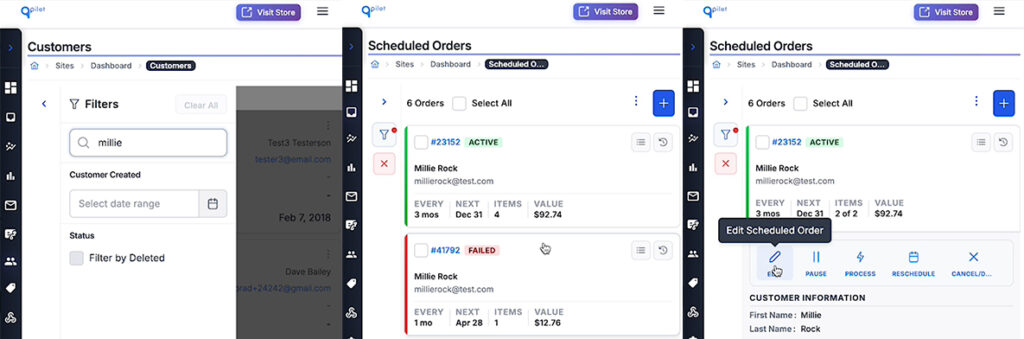
We’ve improved the Merchant Portal to make it easier to find customers and manage their Scheduled Orders on the fly, including from mobile devices. Whether you’re responding to a support message, a chat, or an email, you can now make common changes without waiting to get back to your computer.
With these updates, merchants can:
- Quickly search for and find customers from the Merchant Portal on mobile
- View a customer’s Scheduled Orders in just a few taps
- Take common actions like reschedule, pause, cancel/delete, retry, or activate Scheduled Orders
- Confirm changes instantly and respond to customers faster
These improvements make it easier for support teams and busy founders to help subscribers in the moment. Fewer delays, less back-and-forth, and a smoother experience for everyone involved.
It’s another step toward making subscription management simpler, more flexible, and easier to handle wherever you are.
COMING SOON: Snooze Instead of Pause
Coming soon for Shopify and WooCommerce
Pausing a subscription often turns into a silent cancellation.
Snooze solves that.
Subscribers can delay their next renewal, and their Scheduled Order automatically resumes based on your settings, so paused subscriptions don’t quietly disappear.
No manual reactivation. No recovery workflows to manage.
Built to Make Subscriptions Easier to Manage
Every update above came directly from merchant requests and real workflows.
If you want to see how these features work in practice, or how they can support your subscription strategy, you can explore them now or walk through them with our team.
Try Autoship free for 14 days or request a demo to see what’s new.

Explore related to Product Updates